vber-ai.com / products / pdf-editor

PDF Editor · free, private, no upload

Edit the PDF you have, in the font it already uses.

Click any line of text and retype it: the editor reuses the font embedded in the PDF, matches its colour and opacity, and covers the original cleanly. Signatures, forms, merge, split, organise, image conversion, translation and grammar fixes are all built in — and your files never leave your device.

8PDF tools, from Edit to Translate
11Editor tools, plus a signature studio
40Fonts included, from Arial look-alikes to handwriting
0Files uploaded — it all runs in your browser
pdf.vber-ai.com
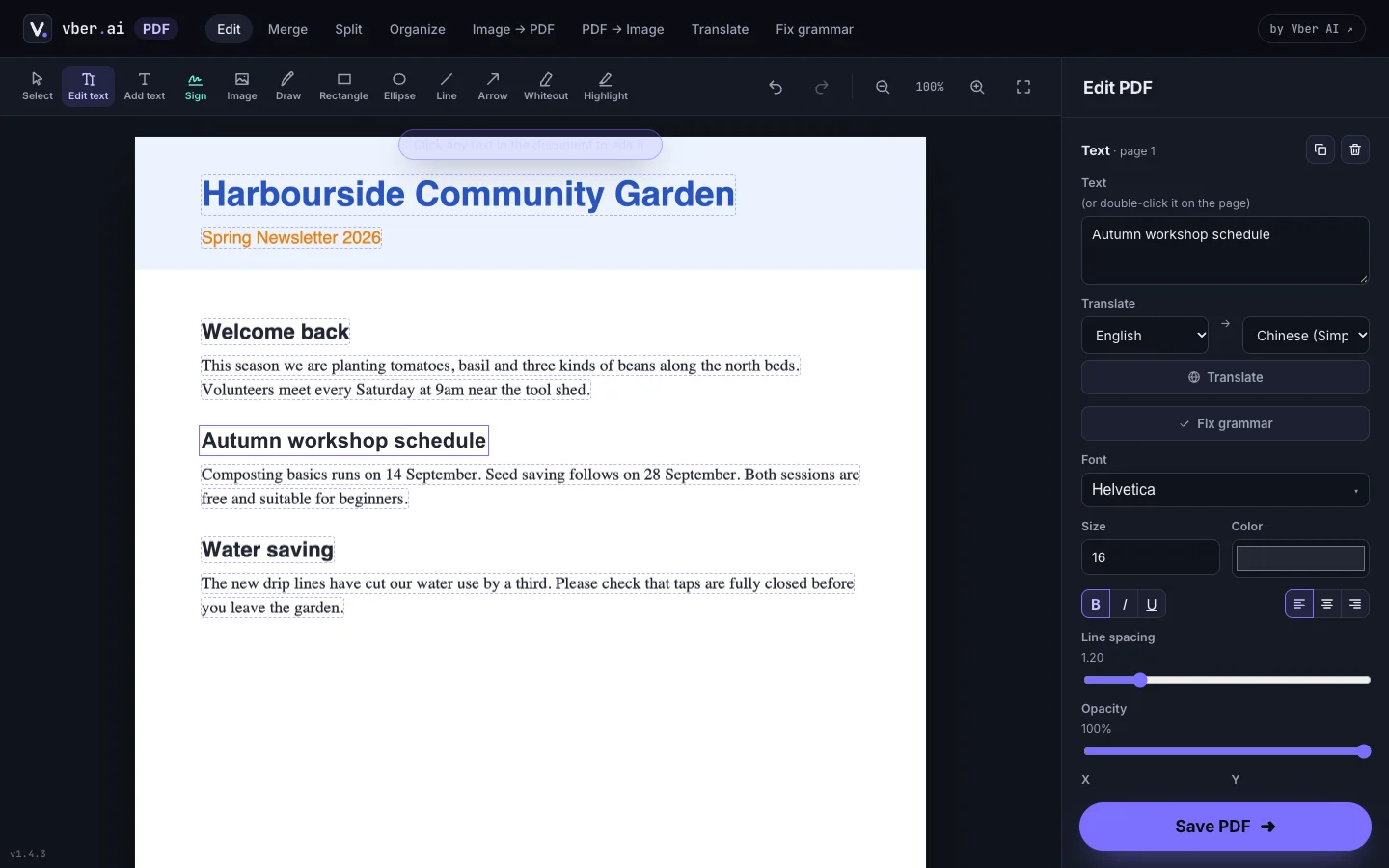
PDF Editor replacing a heading in a PDF in its original bold font, with the text properties panel open

01 The problem

Most "free" PDF editors want three things: your file, your email and your money.

01

Uploading contracts to a stranger's server

Online PDF tools process files on their servers. That's a hard no for payslips, leases and client documents.

02

Edits that look pasted on

Typical editors draw new text in Helvetica over the old line. The font, size and colour never quite match, and everyone can tell.

03

Watermarks and paywalls

The edit is free; downloading it without a watermark is not. Signing is usually a separate subscription.

02 Features

Real screenshots of the running app, using a fictional community-garden newsletter.

Edit existing text

Change the words, keep the look

Click a line, retype it, done

What it does — every line in the PDF becomes clickable. Your new text is drawn in the PDF's own embedded font where it has the characters, at the original size, colour and opacity, on top of a cover that matches the page background.

  • Reuses the document's embedded fonts; missing characters fall back, letter by letter, to the closest match
  • Mixed-colour lines are split so a red label stays red and the black text stays black
  • Add text, images, shapes, arrows, highlights and whiteout, each on its own layer
  • Layers you can reorder, hide and lock; 200-step undo; precise X / Y / W / H fields
Sign & fill

Signatures that look hand-made

Draw, type or upload — then place it anywhere

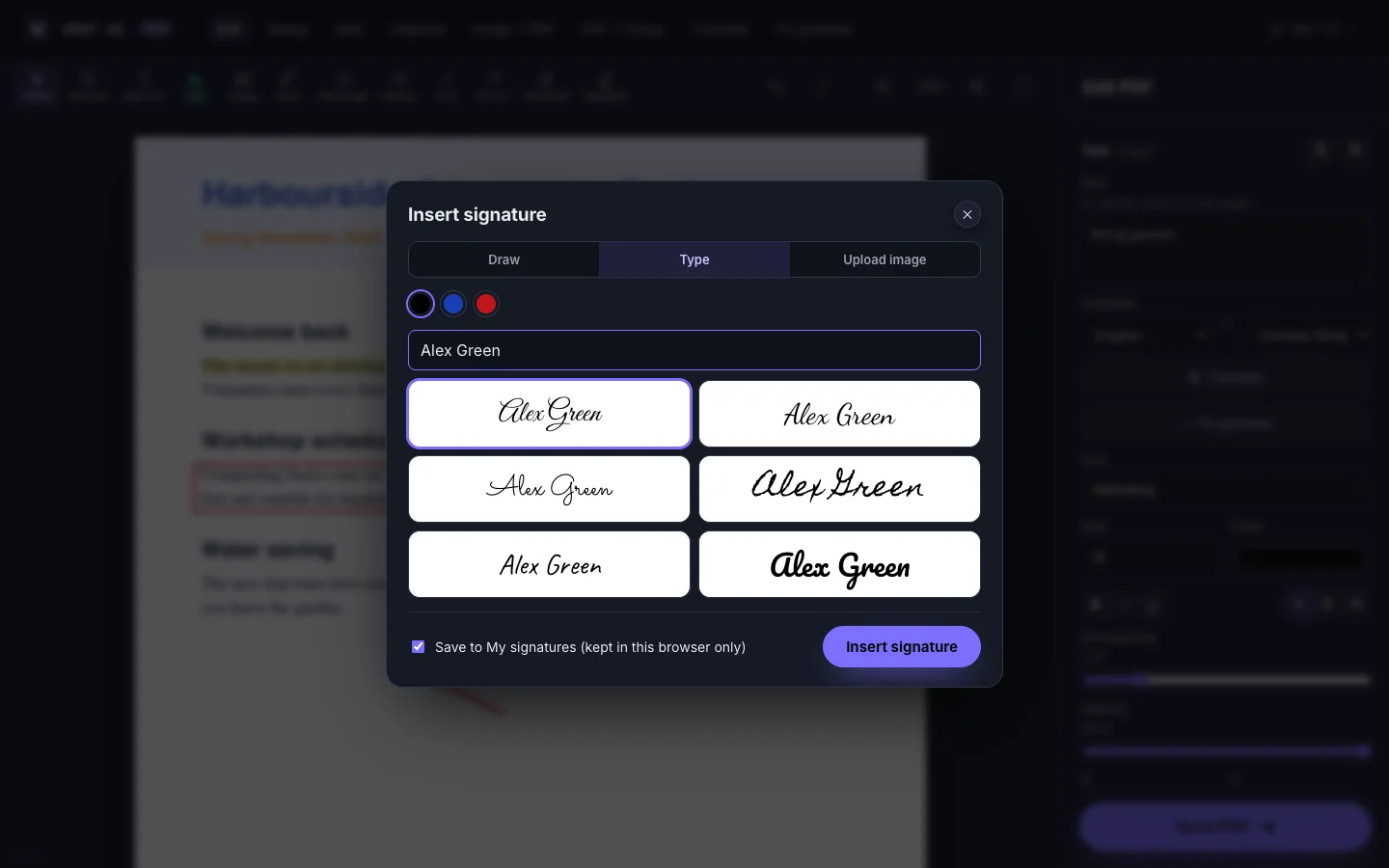
What it does — draw with a mouse, finger or stylus, type your name in one of six handwriting fonts, or upload a photo of your signature and let the editor strip the paper background.

  • Stroke width follows your speed, and stylus pressure when you use a pen
  • Photo signatures: white background removed, soft ink edges kept, auto-cropped to the ink
  • Keep up to 12 signatures in this browser only
  • Fill PDF form fields — text, checkboxes, dropdowns and radio groups — and optionally flatten them
Organise & convert

Every everyday PDF job

Merge, split, organise, image ↔ PDF

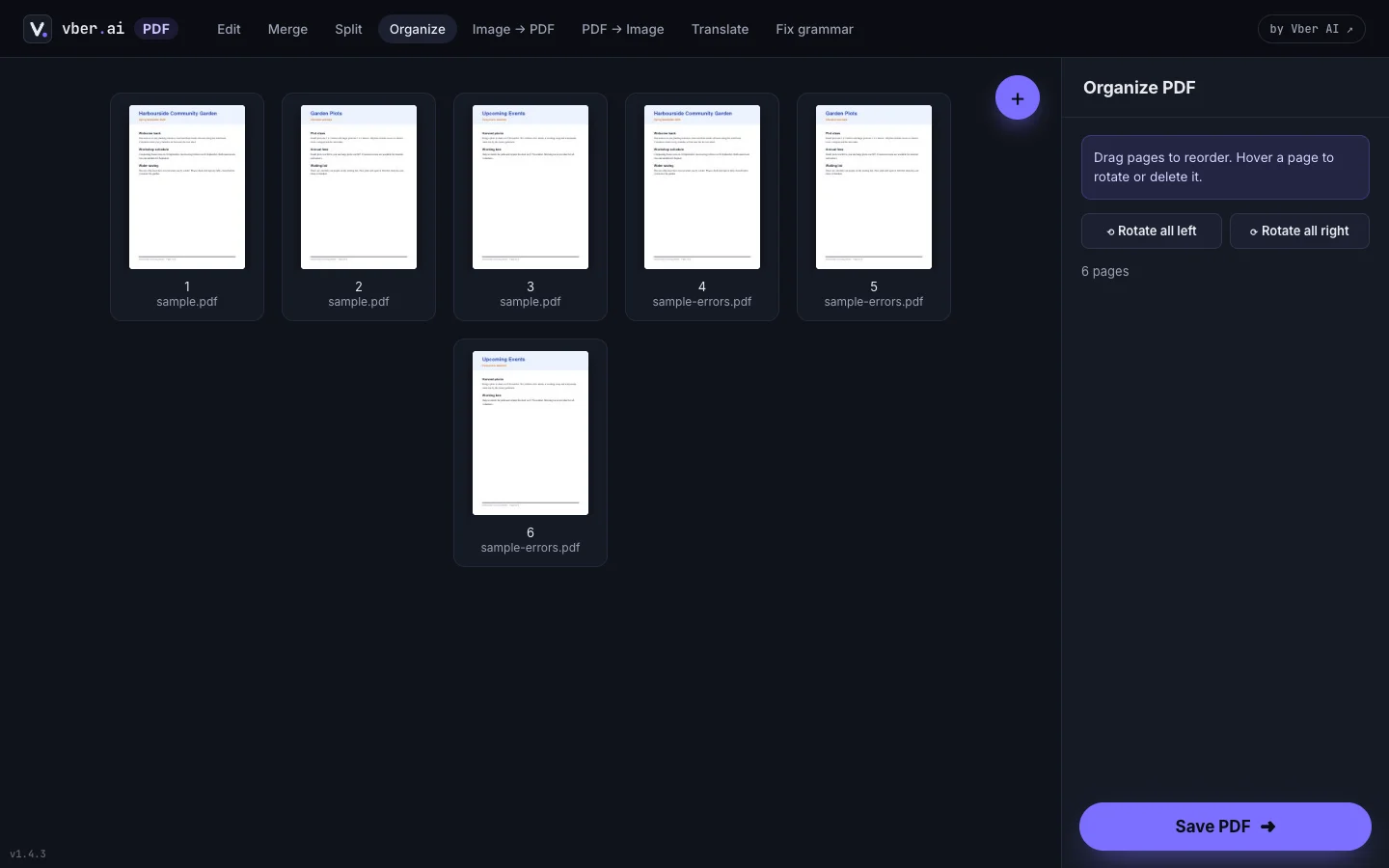
What it does — drop one PDF to edit it, several to merge them, or images to make a PDF. Reorder and rotate pages across files, split by range, or export pages as JPG/PNG.

  • Split by range, every page, or pick pages — optionally merged back into one file
  • Organise: drag to reorder, rotate, delete and mix pages from several PDFs
  • Image to PDF in A4, US Letter or image size, with orientation and margins
  • PDF to image at 96, 150 or 300 dpi, zipped when there are several pages
Translate & fix grammar

Rewrite a whole PDF, keep the layout

Every line replaced in place, after you review it

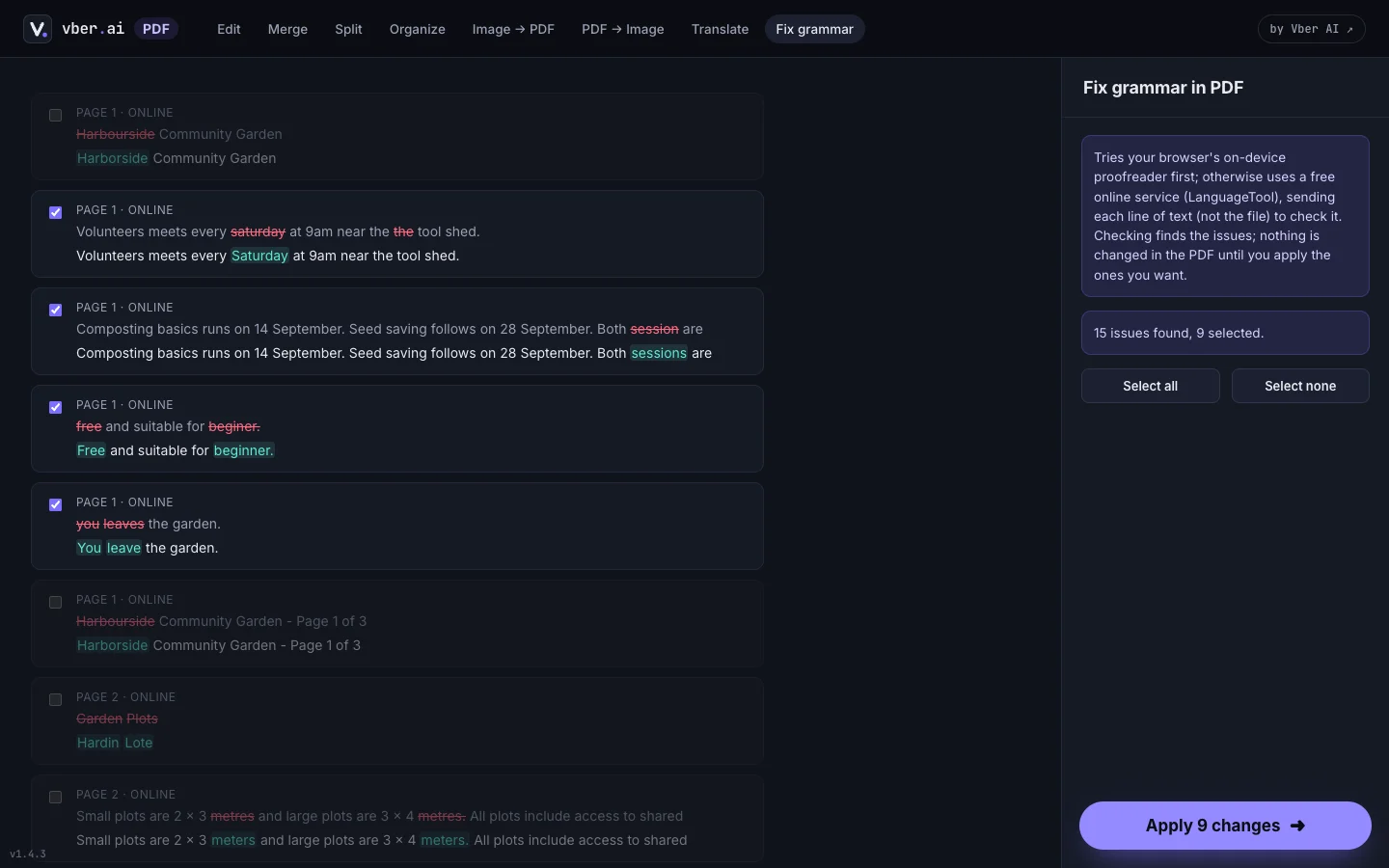
What it does — translate a PDF into one of 20 languages, or fix its grammar, line by line. Each changed line is shown as a before/after diff with a checkbox, so nothing changes until you apply it.

  • Uses the browser's on-device translator and proofreader first, when available
  • Word-level diff highlights exactly what changed in each line
  • Longer translations shrink to fit the original line's width
  • Lines that couldn't be processed are counted and left untouched, never half-changed

03 Everything included

No uploads, no account, no watermark — and nothing to pay for.

Aa

Original-font editing

Retype any line in the font, size and colour it already uses.

✍

Signatures

Draw, type in six handwriting styles, or upload a photo with the background removed.

☑

Form filling

Text fields, checkboxes, dropdowns and radio buttons — flatten when done.

⇄

Merge & split

Combine files, split by range, or pick exactly the pages you need.

↻

Organise

Reorder, rotate and delete pages across several PDFs at once.

▣

Image ↔ PDF

Photos to PDF in A4 or Letter; pages to JPG or PNG at up to 300 dpi.

文

Translate

20 languages, line by line, keeping the original layout.

✓

Fix grammar

Review every change before it touches your PDF.

04 Privacy & security

The safest upload is the one that never happens.

  • No file is ever uploadedEdit, Merge, Split, Organise and both image conversions run entirely in your browser.
  • Honest about the one exceptionTranslate and Fix grammar try on-device AI first. If it isn't available, individual lines of text — never the file — go to a free service, and the app tells you when that happens.
  • No trackingNo analytics, no third-party fonts and no CDNs.
  • Signatures stay with youSaved signatures live only in this browser's storage.
  • Safe failuresEncrypted and password-protected PDFs are refused with a clear message rather than written as garbage.
  • Not redactionEdited text covers the original visually; the old text remains underneath. Use a redaction tool for anything that must be removed.

05 FAQ

Is it really free?

Yes — no account, no watermark and no limits. There's no server bill behind it, because your computer does the work.

Are my files uploaded?

No. The only time text leaves your device is the fallback for Translate and Fix grammar, when on-device AI isn't available — and then it's individual lines, never the file.

Can I edit text in any PDF?

Any PDF with real text. Scanned pages are images and there's no OCR, and rotated or tiny text is skipped. Everything else is clickable in Edit-text mode.

Will the edited text match?

It uses the PDF's own embedded font whenever that font has the characters you type, plus the original size, colour and opacity. Characters it lacks fall back to the closest available font.

Which browsers work best?

Any modern browser works. Chrome and Edge add your installed fonts and on-device translation and proofreading.

Can I use it inside AI Document?

Yes — brokers open, edit and sign PDFs from a client's folder and save them back as a new version.

Your next PDF edit, without the upload.

Open the editor and drop a file in — nothing to install, nothing to sign up for.