vber-ai.com / products / grammar-checker

Grammar Checker · free, private, in your browser

Fix your writing without sending it anywhere.

Spelling, grammar and style are checked as you type by a grammar engine that runs inside your browser, so your words never leave your device. Australian, British, American, Canadian and Indian English, .docx support, and one-click fixes that a normal Ctrl+Z undoes.

936Grammar, spelling and style rules (924 on by default)
5English dialects, Australian by default
250 msAfter you stop typing, your text is re-checked
0Bytes of your writing sent to a server
grammar.vber-ai.com
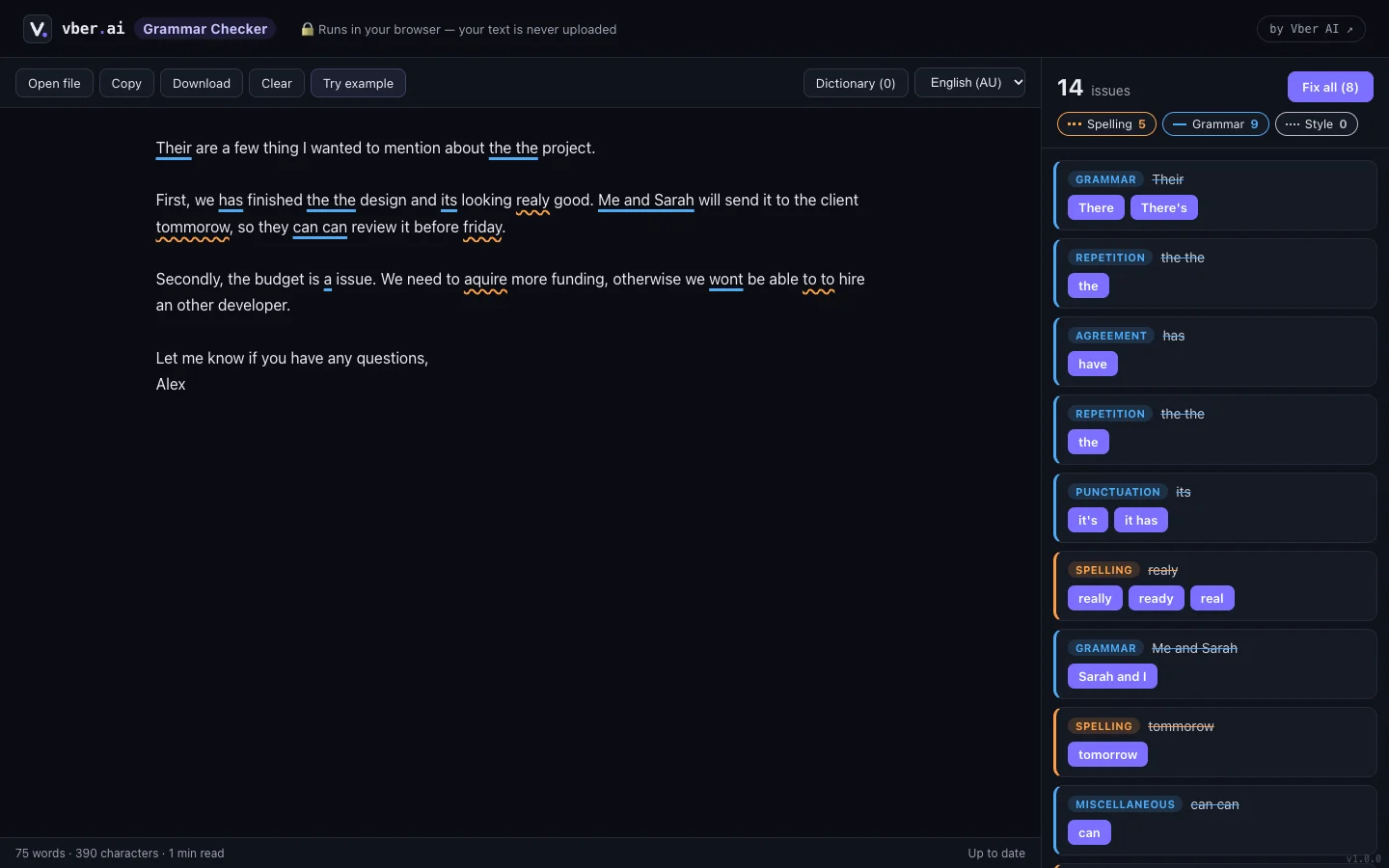
Grammar Checker with spelling, grammar and style issues underlined and listed with suggested fixes

01 The problem

Most grammar tools are cloud services. That's fine for a birthday card — not for a client email or a contract.

01

Everything you type is uploaded

Online checkers send each keystroke's text to their servers to analyse it. Confidential drafts included.

02

AI rewrites change your voice

Generative tools "improve" whole sentences and sometimes invent things. You wanted a typo fixed, not a new paragraph.

03

Sign-ups and upsells

The useful checks sit behind an account, a browser extension and a monthly plan.

02 Features

Real screenshots of the running app, using its built-in example text.

Check as you type

Every issue underlined in place

Spelling, grammar and style — with the fix one click away

What it does — paste, type or drop in a .txt, .md or .docx file. Issues are underlined right in the text and listed in a sidebar with an explanation and suggested fixes. Click an underline, or move the cursor into one, to fix it on the spot.

  • Three groups — Spelling, Grammar and Style — each with its own colour and line style (wavy, solid, dotted)
  • Filter the list by group; click a card to jump to that spot in the text
  • "Fix all" applies only fixes with a single clear answer, and leaves choices to you
  • Every fix — even Fix all — undoes with one Ctrl+Z
Your words, your rules

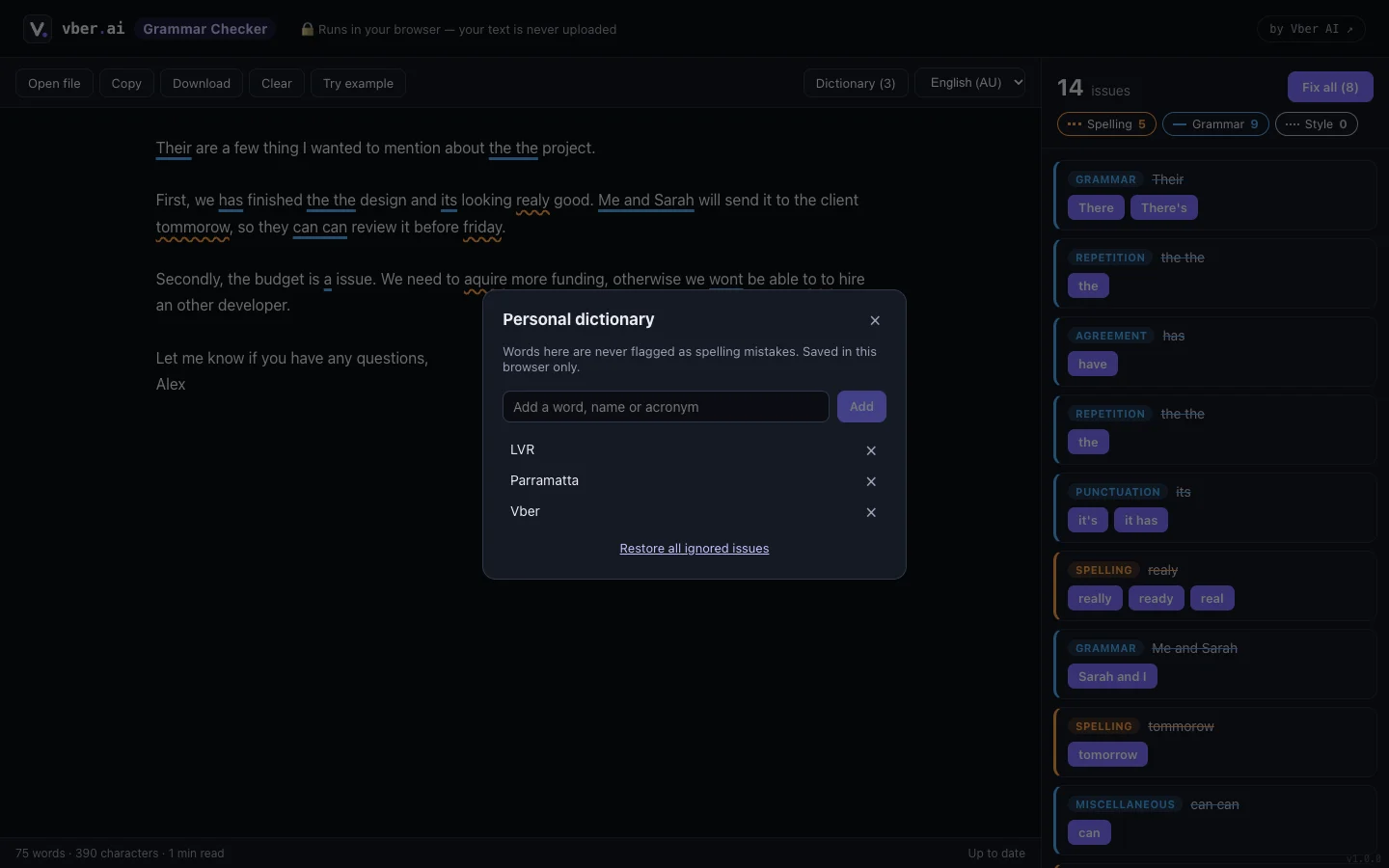
A dictionary that learns your names

Names, acronyms and jargon stop being flagged

What it does — add client names, product names and industry acronyms to your personal dictionary, or ignore a single issue. Both are saved in your browser and applied to every future check.

  • Personal dictionary saved in this browser only
  • Ignore one issue without turning off the whole rule — and restore all ignored issues in one click
  • Switch between five English dialects at any time
  • Live word count, character count and reading time
Anywhere

Works on your phone, too

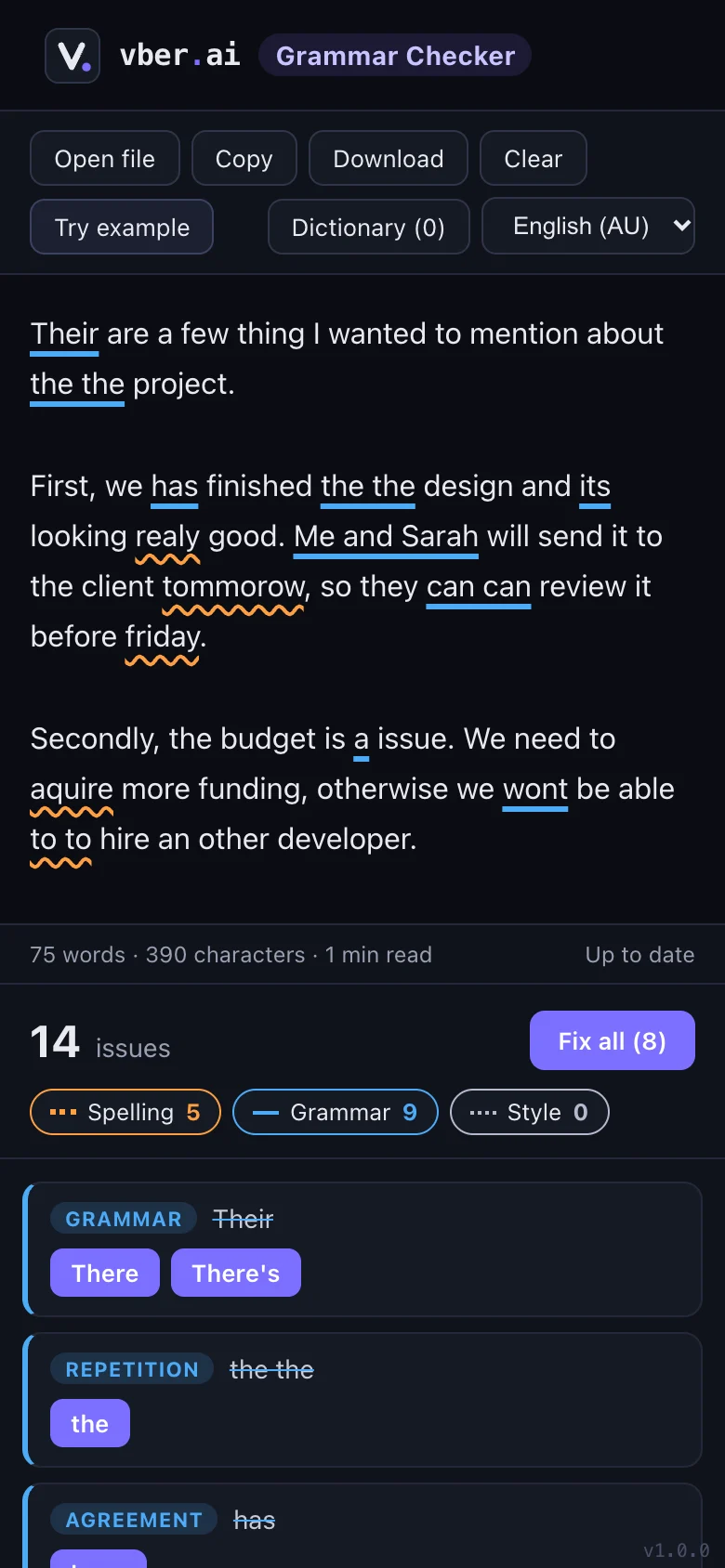
The same checker in a stacked mobile layout

What it does — on narrow screens the editor sits above the issues list, so you can check a message before you send it from your phone.

  • Your text and settings are restored when you come back
  • Copy the corrected text or download it as a .txt file
  • Open Word documents straight from your phone's files
  • No app to install and no account

03 Everything included

Free, with no account and no limits.

Abc

Spelling

Typos, misspellings and doubled words caught as you type.

G

Grammar

Agreement, articles, its/it's, word order and more — 936 rules.

S

Style

Wordiness and readability hints you can take or leave.

AU

Five dialects

Australian, British, American, Canadian and Indian English.

↩

Undo any fix

Every fix — even Fix all — comes back with Ctrl+Z.

W

Word files

Open .docx, .txt and .md files, or just drag them in.

+

Personal dictionary

Teach it names, brands and acronyms once.

0

Nothing uploaded

Checking happens on your device — safe for confidential text.

04 Privacy

The app code makes no network calls. The only download is the grammar engine itself, from the same site.

  • Your text is never uploadedChecking happens in a Web Worker inside your browser tab.
  • Word files stay local.docx files are read on your device; nothing is sent anywhere to convert them.
  • Saved only in this browserYour text, dictionary and settings are kept in local storage so they're there next time. Clear removes the text.
  • No trackingNo analytics, no web fonts, no CDN and no account.

05 FAQ

Is it free?

Yes, with no sign-up. There's no server or AI bill behind it, so there's nothing to charge for.

Does it use AI to rewrite my text?

No. Harper is a rule-based engine: it flags specific problems and suggests specific fixes. It never rewrites a sentence or invents content.

Why is the first visit about 8 MB?

That's the grammar engine, compiled to WebAssembly. Your browser keeps it, so later visits start instantly.

Which English does it check?

Australian (the default), British, American, Canadian and Indian English. You can switch at any time.

Can I check a Word document?

Yes — open or drop a .docx file and its text is loaded into the editor. Download saves the corrected text as .txt.

Where is my text stored?

Only in this browser's local storage, so it's still there if you refresh. Press Clear to remove it.

Check your next email before you send it.

Paste it in — it's checked in your browser, and it stays there.