vber-ai.com / products / ai-document

AI Document · for Australian mortgage brokers

From a pile of client documents to a lodgement-ready file.

AI Document reads every payslip, bank statement, tax return and ID your client sends, checks them, and builds the fact find, CRM record and submission summary for you — with client folders, a pipeline and your Microsoft 365 email in one portal. Built by a working broker, for brokers.

22Australian document types read automatically
5Number checks: TFN, ABN, ACN, Medicare, BSB
~$0.12Estimated AI cost per client file
1Portal for documents, clients, pipeline & email
ai-document.vber-ai.com
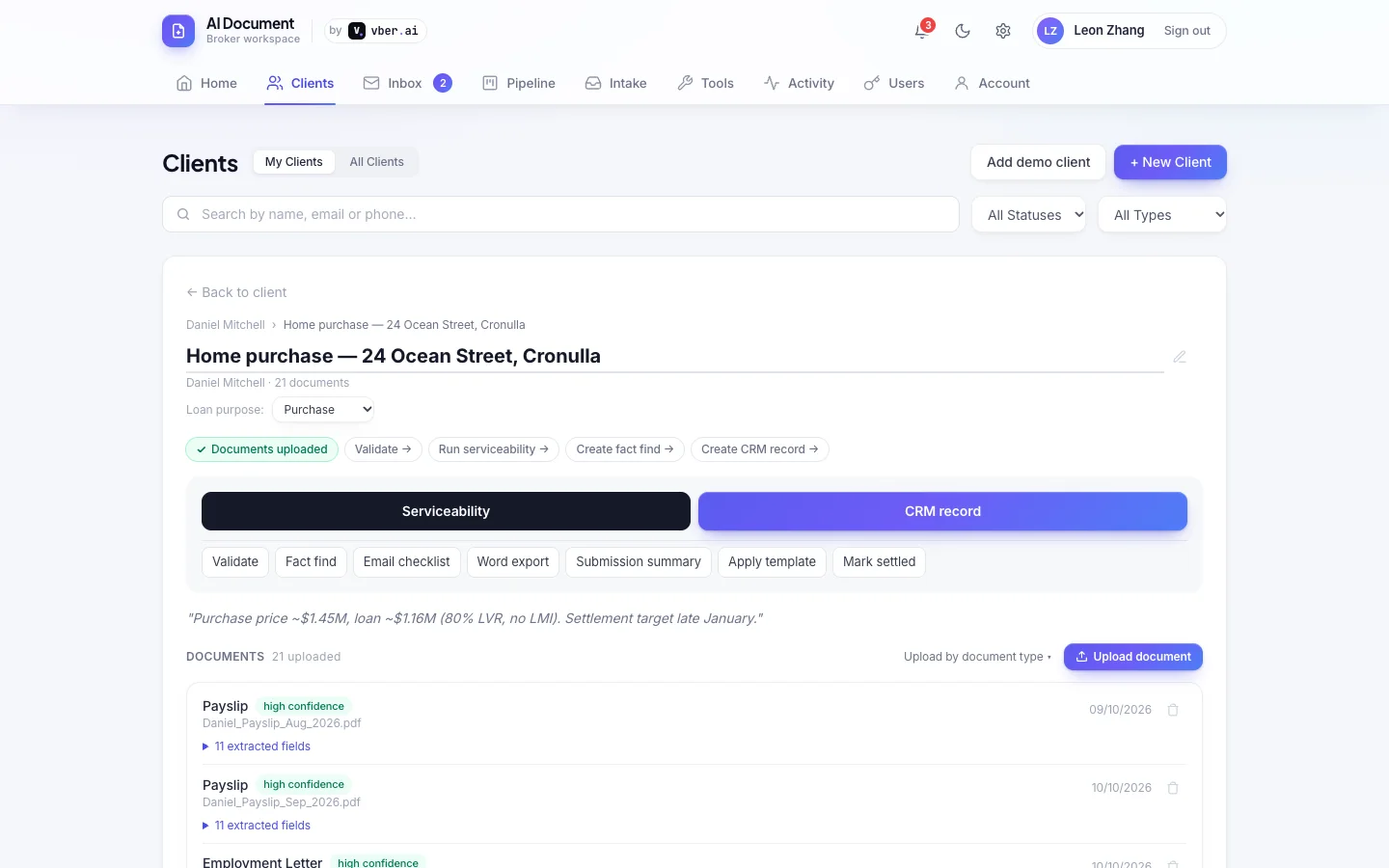
An application in AI Document with 21 documents read and checked

01 The problem

Most of a broker's week isn't advice — it's paperwork. AI Document takes the paperwork.

01

Chasing and sorting documents

Files arrive by email, text and portal, half named "scan.pdf". Someone has to open each one, work out what it is and file it.

02

Keying the same numbers again

Income, employer, account balances and liabilities get typed into the fact find, the CRM and the lender's forms — and every retype is a chance for an error.

03

Client emails everywhere

Conversations live in personal inboxes, attachments get lost, and it's hard to show compliance what was sent to whom and when.

02 How it works

Five steps from first contact to settlement — the AI does the reading, you stay in control of every decision.

  1. Collect

    Send the client a document checklist and a secure upload link, drop files in bulk, or file attachments straight from their emails.

  2. Read

    Each document is classified and its fields extracted — with the page and quote every value came from.

  3. Check

    Tax and ID numbers are verified, low-confidence reads get a second, stronger look, and anything odd is flagged for you.

  4. Build

    Validate the file, run serviceability, and generate the fact find, CRM record, Word export and submission summary.

  5. Track

    Move the application through your pipeline, with reminders and alerts when documents go stale.

03 Features

Real screenshots from the running product, using a fictional demo client.

Document AI

Reads documents like an experienced assessor

Payslips, bank statements, tax returns, NOAs, ID, company financials and more

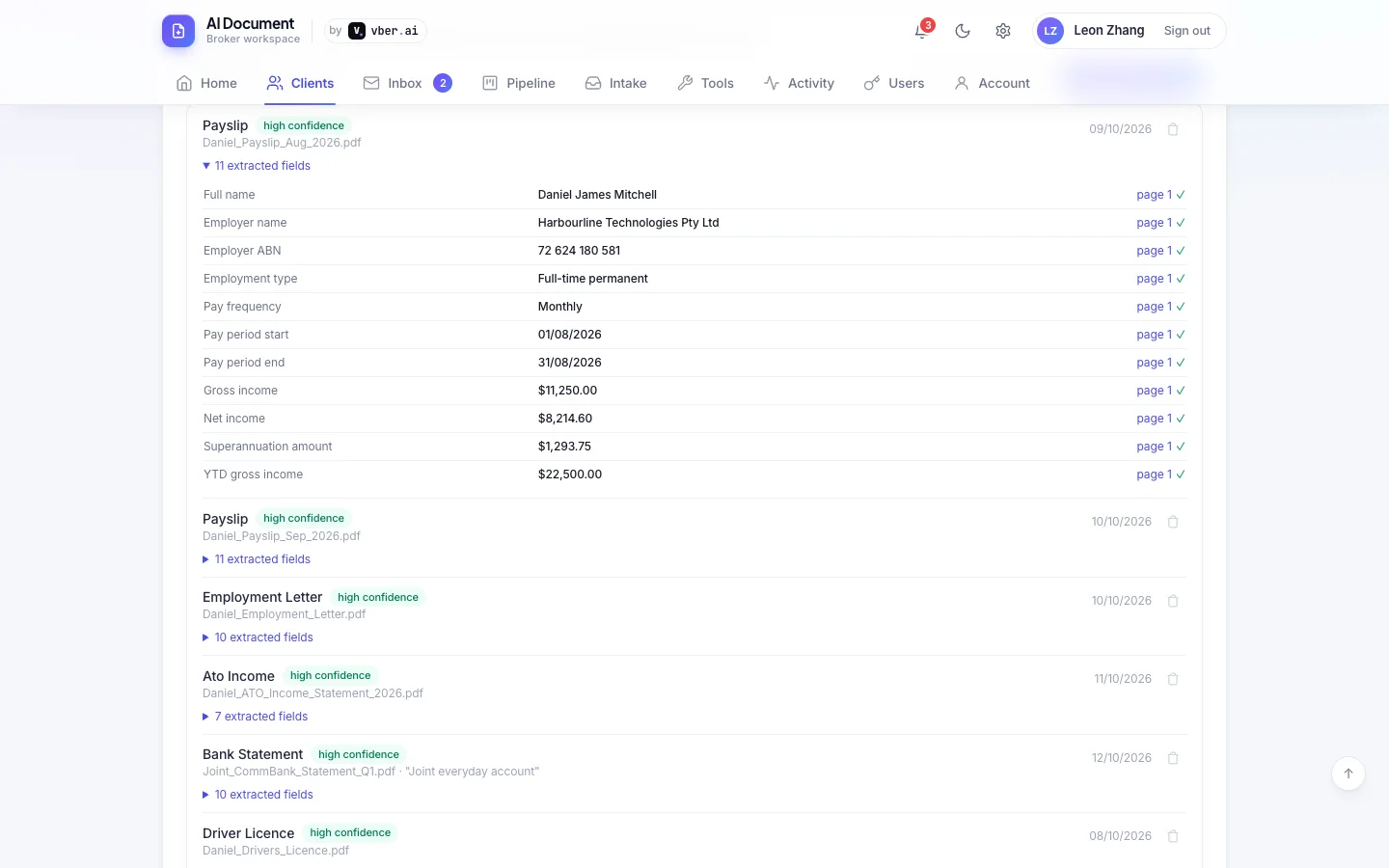
What it does — each file is read once by the AI, which works out what it is and pulls out the fields a lender cares about. Every value is tied to the page and the exact words it came from, and checked against the PDF itself.

  • 22 document types, from payslips and ATO income statements to BAS, trust distributions and strata levies
  • Check-digit validation for TFN, ABN, ACN, Medicare and BSB — typos are caught, not copied
  • Confidence on every document; unclear reads are escalated to a stronger model automatically
  • Client portal uploads are processed in low-cost batches; every AI call's cost is logged
Clients & applications

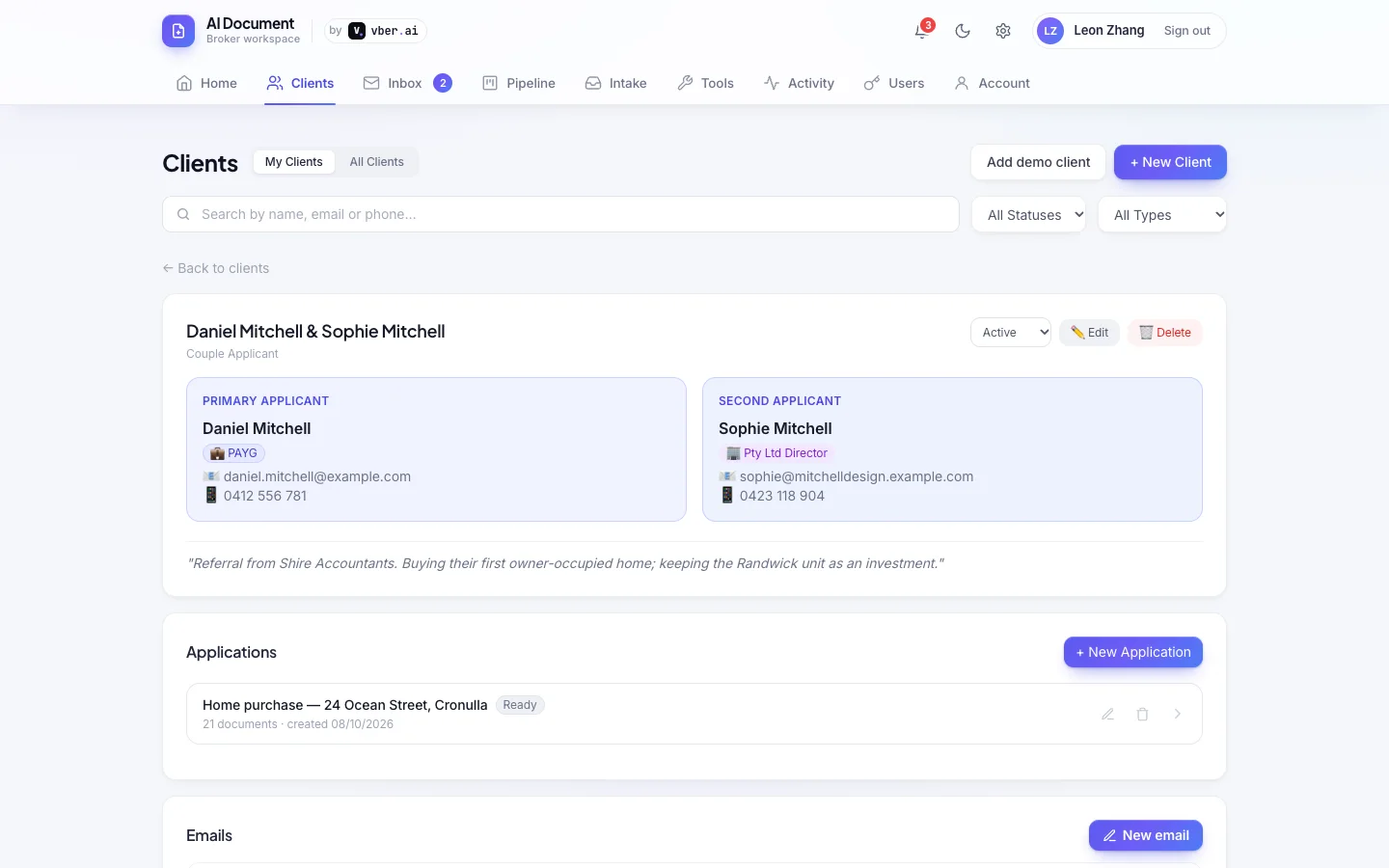
One place for every client and every file

Single and couple applicants, multiple applications per client

What it does — each client has their applicants, applications, notes and a document library that files itself: uploads from the portal, intake and email land in the right folder by type.

  • Folders for ID, income, bank statements, tax, property, liabilities, lender forms and signed documents
  • Version history on every file, search across all documents, and download everything as a ZIP
  • Open a PDF to edit, fill or sign it in the browser and save it back as a new version
  • Notes and activity timeline on every client
Email · Microsoft 365

Your company email, inside the CRM

Read, reply and file — sent from your own mailbox, kept in your Sent Items

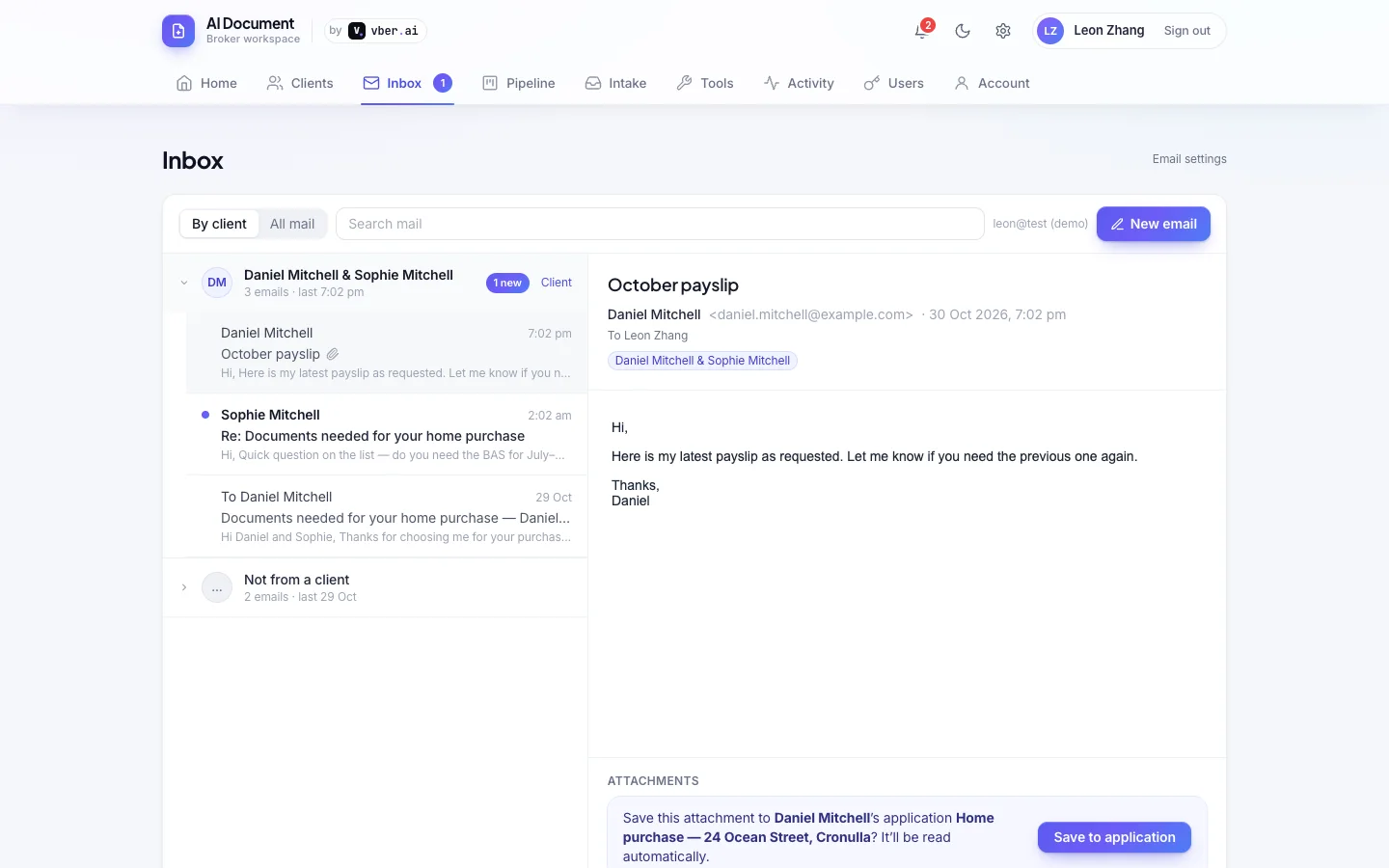
What it does — connect Microsoft 365 once and your mail shows up next to your clients. Emails are sent from your own address, so your firm's normal retention and compliance apply.

  • Inbox grouped by client with unread counts — or a traditional newest-first view
  • A client emails a payslip? One click files it into their application and reads it
  • Templates for common updates, your signature, and attachments straight from the client's folder
  • Unread badge and alerts for new client emails; every send is logged against the client
Pipeline & reminders

Nothing falls through the cracks

From documents to settlement, at a glance

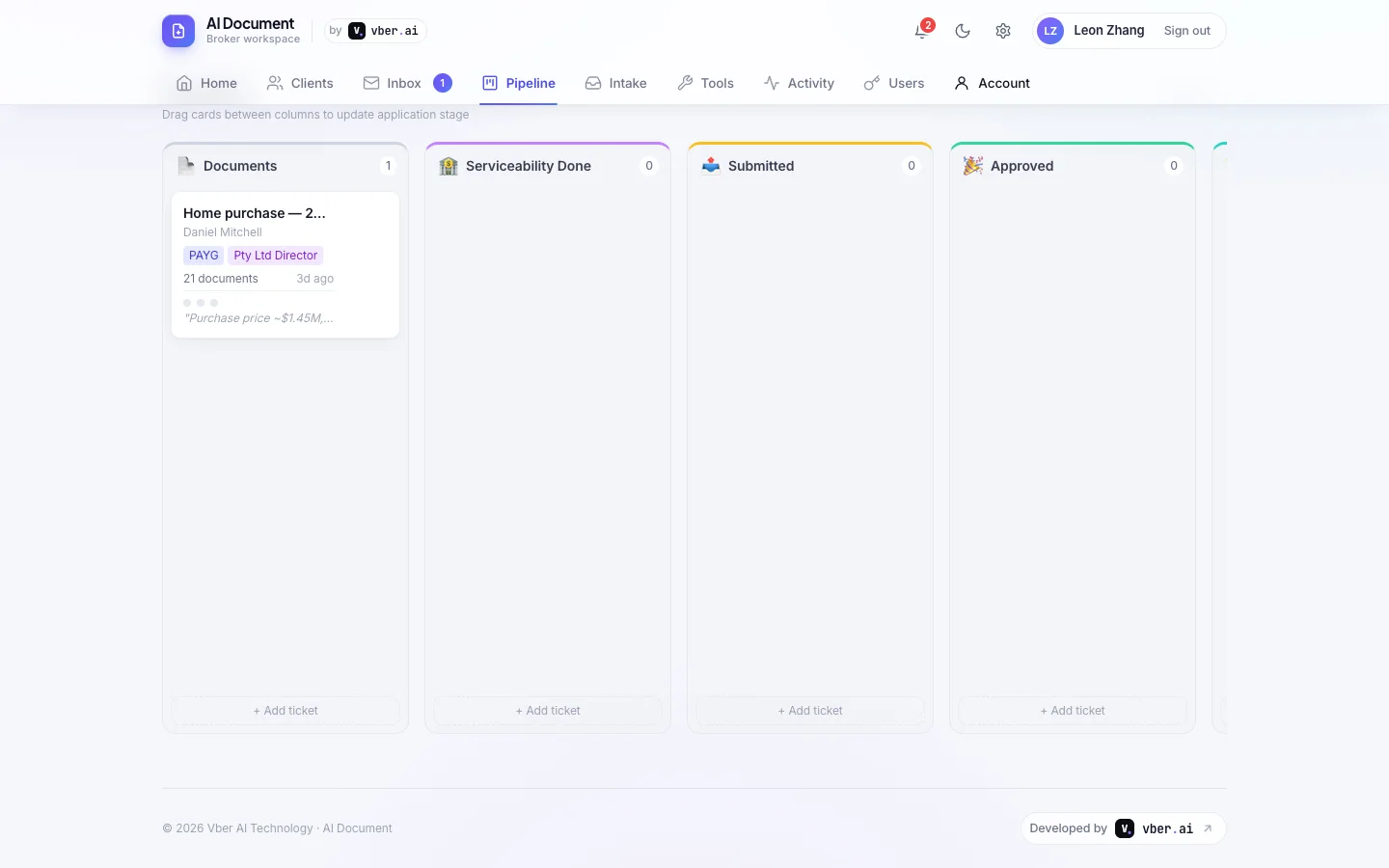
What it does — a drag-and-drop pipeline shows every application's stage, document count and progress. The home dashboard shows today's reminders and where your clients are.

  • Custom pipeline columns, names and icons to match how you work
  • Reminders per client, with overdue items highlighted
  • Alerts when payslips, statements or tax documents are getting too old for lenders
  • Mark settled and keep the full history
Broker tools

The calculators you use every day

Built in, next to the client file

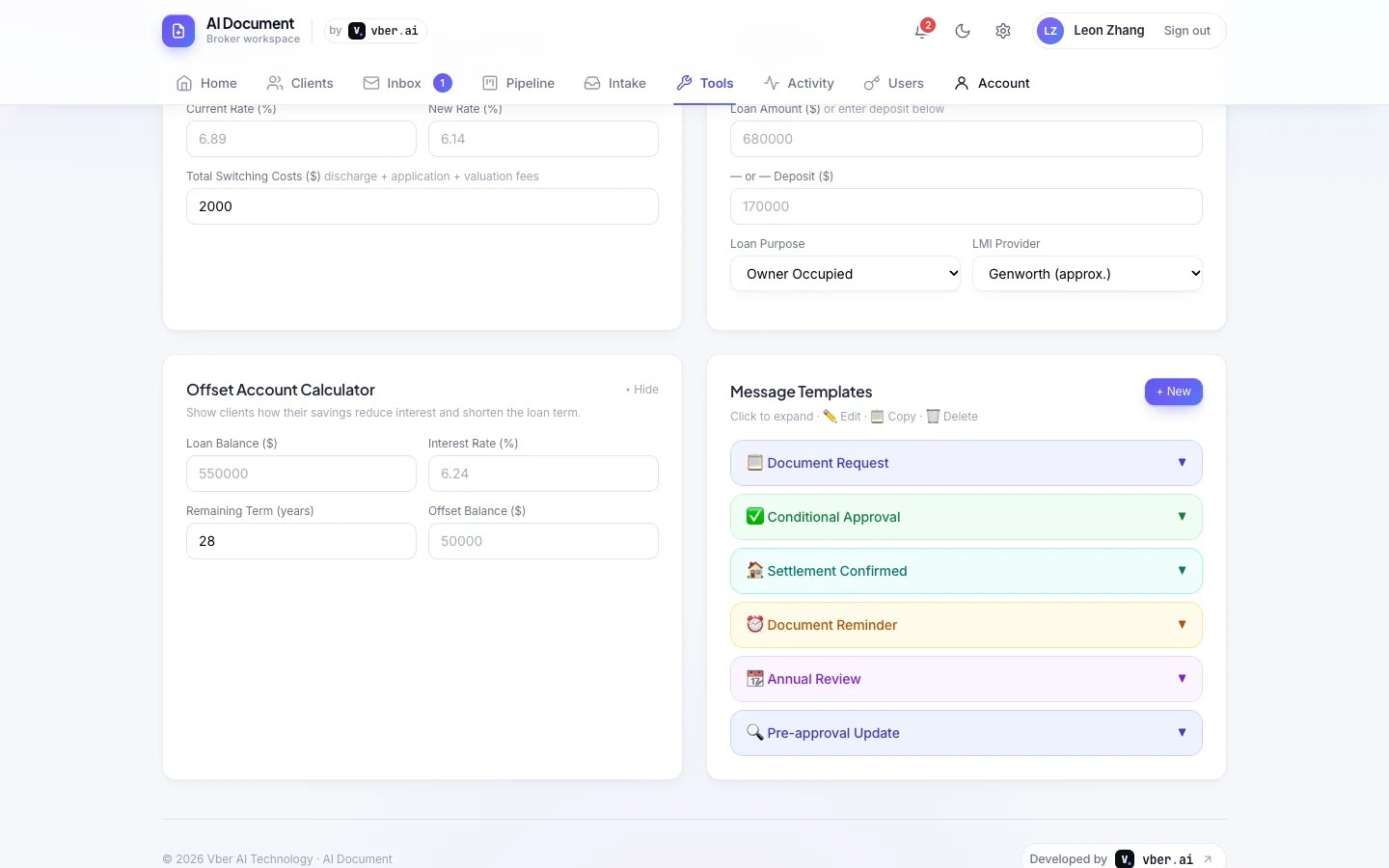
What it does — the everyday maths of broking, a click away, plus serviceability on the application using your own lender rates and buffers.

  • Repayment, stamp duty (all states & territories), LVR & LMI, refinance break-even and offset calculators
  • Serviceability with editable lender floor rates, buffers and rental shading
  • Message templates you can copy into SMS or chat
  • Light and dark mode

04 Everything included

No modules to buy separately.

AI

Document reading

Classify and extract 22 document types, with sources for every field.

✓

Validation

Cross-checks the file and flags missing, conflicting or stale documents.

FF

Fact find

Pre-filled from the documents, ready for you to review.

CRM

CRM record

A structured client summary generated in one click.

$

Serviceability

Income, expenses and liabilities against lender rules you control.

W

Word export & summary

Submission summary and an editable Word document for the lender.

@

Document checklists

Emails per loan type — PAYG or self-employed, purchase, refinance or construction.

↑

Client upload portal

A secure link for clients to upload, with no account to create.

⇪

Bulk intake

Drop a client's whole folder in; it's sorted and filed for you.

✉

Microsoft 365 email

Inbox, replies, templates, signature and attachments in the CRM.

≡

Pipeline

Kanban stages, reminders and document-age alerts.

+

Teams

Multiple brokers, admin oversight and client reassignment.

05 Pricing

Every brokerage is different, so pricing is tailored to your team size, document volume and any custom features you need.

Contact us for pricing

Tell us how many brokers you have and roughly how many client files you handle a month, and we'll come back with a quote.

  • Every feature on this page — no modules to add on
  • Microsoft 365 email connection for each broker
  • Onboarding, including setting up your checklists, templates and lender rates
  • Custom features built on request

06 Security & compliance

Client documents are sensitive. AI Document is built to keep them that way.

  • Encrypted at restStored documents and sensitive extracted data such as TFNs and account numbers are encrypted.
  • Your mailbox, your recordsEmails go out from your own Microsoft 365 address and stay in your Sent Items. The app never sees your password.
  • Full audit trailLogins, uploads, emails and every AI call — with model and cost — are recorded in the activity log.
  • Each broker sees their own clientsAdmins can see across the team and reassign clients when someone leaves.
  • Safe email viewingEmails open in a locked-down viewer: scripts never run and remote images stay hidden until you allow them.
  • Backups on demandAdmins can download a full backup of the data at any time.

07 FAQ

Who is AI Document for?

Australian mortgage brokers and small brokerages who want to spend less time on paperwork. It handles PAYG and self-employed clients (sole traders, company directors, trusts), for purchases, refinances and construction loans.

Does the AI make the decisions?

No. It reads and organises the documents and drafts the fact find and CRM record; you review and decide. Every extracted value shows where it came from, so checking takes seconds.

How much does AI Document cost?

Pricing depends on your team size and volume — contact us for pricing and we'll send a quote.

What does the AI cost?

We estimate around US$0.12 in AI usage for a typical client file of about ten documents. The exact cost of every AI call is shown in the activity log, so there are no surprises.

Which email providers work?

Microsoft 365 (Outlook) today. Brokers who don't connect their mailbox can still send checklist emails from a shared address.

Can my clients upload documents themselves?

Yes. Send them a checklist email with a secure upload link — no account needed. Their files are read, filed and attached to the right application automatically.

Can it be tailored to my brokerage?

Yes. Checklist emails, message and email templates, pipeline stages and lender rates are all editable, and Vber AI can build custom features on request.

How do I try it?

Book a demo and we'll walk you through a complete fictional client file, from upload to submission summary, then set up an account for your team.

See your next client file build itself.

A 20-minute walkthrough with a full demo client — documents, fact find, email and pipeline.